DRAKE with a new Configure Access screen

🎉 Introducing the New and Improved Configure Access Screen in DRAKE! 🎉
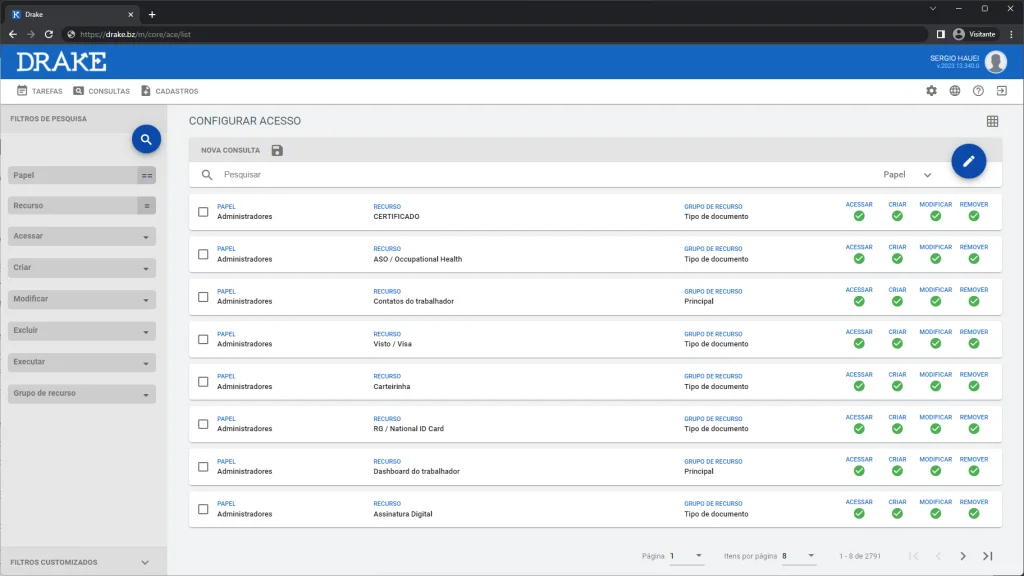
All possible combinations of roles and resources are already presented for you to configure.
We are very excited to share an important update we made to DRAKE! We heard your feedback and completely redesigned our Configure Access screen. It is now easier to use and much more intuitive.
The new Configure Access screen lets you see every possible permission that can be granted in DRAKE in a much more organized way. You can now easily associate a system resource with a user role, making the process of granting permissions much simpler and more efficient.
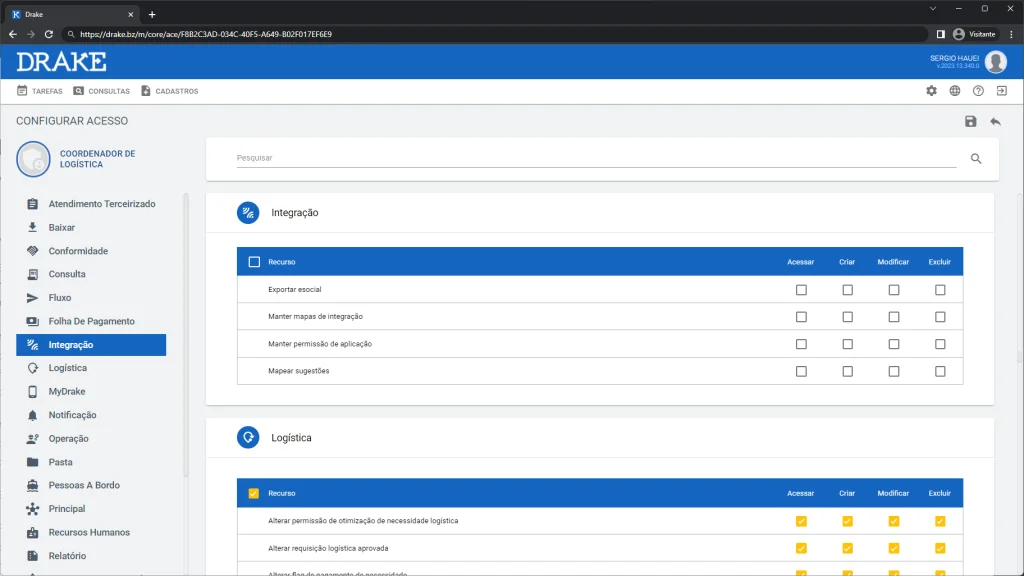
Resources are now grouped by context.
In addition, the new Configure Access screen also lets you filter by role, making it easier than ever to see all the system resources that a user in a specific role would have access to.
We are confident you will love the new screen as much as we do!
To help you get familiar with the new screen, we prepared a detailed lesson that you can find at the link class.sapiensia.com/course-drake-plan-free/ace/pt_br. This guide walks through all the new features and how to use them.
Remember, the new Configure Access screen began rolling out today and will be available to all users by July 24, 2023.
Thank you for your continued support and feedback. We are always looking for ways to improve DRAKE to make it the best possible platform for you.
If you have any questions or need help with the new screen, do not hesitate to contact us.